
Secure Remote Access for SMBs: Why It Matters More Than Ever?
Remote access is no longer just a convenience. For many small and medium businesses, it has become a normal part of daily operations. Staff work from home, managers travel between sites, contractors need temporary access, and business systems may be spread across the office, cloud platforms, and private applications.
This flexibility helps businesses move faster, support staff better, and stay productive from almost anywhere. But it also creates a serious question: how do you let the right people access business systems remotely without opening the door to security risks?
For Australian SMBs, secure remote access should not be treated as an afterthought. It should be designed properly, monitored carefully, and matched to the way the business actually works.
Why Businesses Need Remote Access Today?
Modern businesses rely on access from multiple locations and devices. A staff member may need to open files from home. A bookkeeper may need access to an internal finance system. A technician may need to connect to a server. A business owner may need to approve work while travelling.
Without remote access, work slows down. Staff become dependent on being physically present in the office. Simple tasks become frustrating, and productivity suffers.
However, remote access is not just about “getting connected.” It is about giving people safe, reliable, and controlled access to the systems they need. The more your business relies on cloud services, Microsoft 365, Azure, shared files, line-of-business applications, and remote staff, the more important this becomes.
The Security Problem with Poor Remote Access
Many businesses start with quick fixes. A basic VPN is installed. Remote Desktop is opened. A shared password is used. Contractors are given broad access. Old accounts remain active after staff leave.
These decisions may solve an immediate problem, but they can create long-term risk.
Poorly secured remote access can expose your business to unauthorised logins, stolen passwords, malware, data loss, and operational disruption. If attackers gain access through a weak remote access setup, they may be able to move deeper into the business network, access files, compromise email, or interrupt key systems.
The risk is higher when there is no Multi-Factor Authentication, no device control, no access logging, no user-based permissions, and no clear process for removing access when someone leaves.
Common Remote Access Pitfalls SMBs Face
One common pitfall is relying on traditional VPN access without proper security controls. A VPN can be useful, but if it gives users broad access to the internal network, one compromised device or password can become a much bigger problem.
Another issue is exposing Remote Desktop or management services directly to the internet. This can make systems easier to reach, but it also makes them easier to attack.
Many SMBs also struggle with unmanaged devices. Staff may connect from personal laptops, old machines, or devices without proper security updates. If these devices are not checked or controlled, they can introduce risk into the business environment.
Access creep is another hidden problem. Over time, users collect more permissions than they need. Former staff accounts, unused contractor accounts, and old VPN profiles may remain active. This increases the attack surface without providing any business benefit.
Finally, many businesses lack visibility. They do not know who is connecting, from where, using which device, and to what system. Without visibility, it is difficult to detect suspicious behaviour or respond quickly.
A Better Approach: Secure Access Based on Business Need
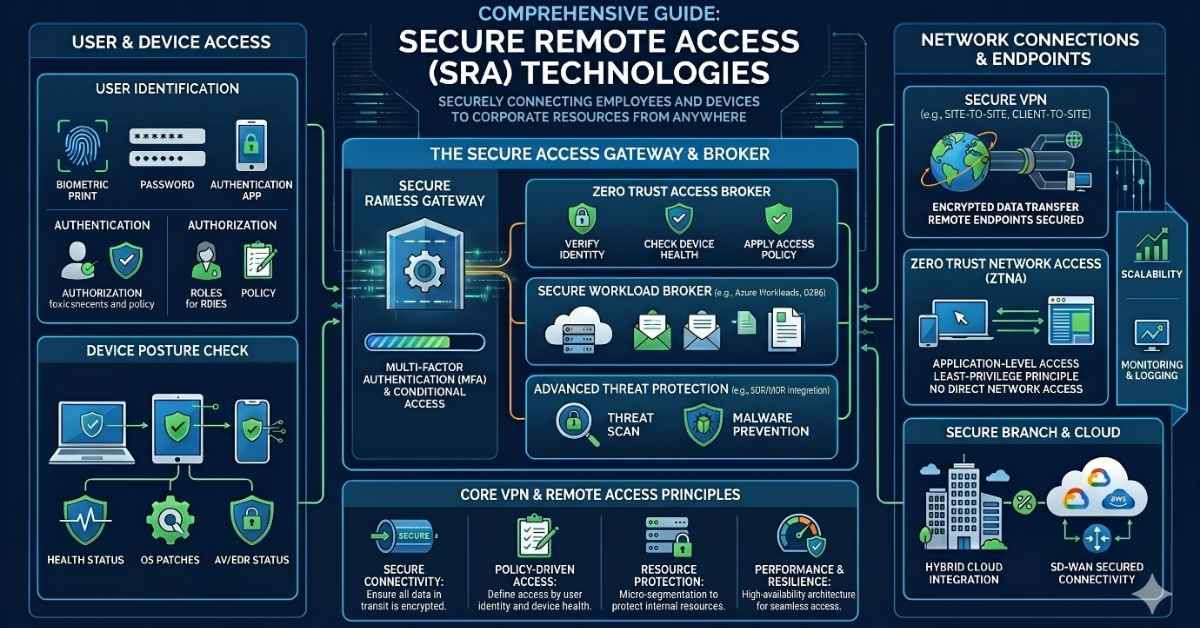
Remote access should be designed around a simple principle: users should only access what they need, when they need it, from trusted devices, using strong authentication.
This is where modern technologies such as Cloudflare, Tailscale, and Azure VPN can help. Each solution has a different role, and the right choice depends on the business environment.
For some businesses, the best answer may be a traditional VPN into Azure. For others, a Zero Trust access model may be more suitable. In many cases, a blended approach works best.
The goal is not to sell one product as the answer to every problem. The goal is to design secure, practical access that fits your staff, systems, risk level, and budget.
Using Cloudflare for Zero Trust Application Access
Cloudflare can be a strong option when a business needs secure access to internal web applications, cloud-hosted systems, or private resources without exposing them directly to the public internet.
With Cloudflare Tunnel and Cloudflare Zero Trust, businesses can publish access to specific applications while keeping the origin service protected. Instead of opening inbound firewall ports, connections can be made through secure outbound tunnels.
This approach can reduce exposure and give the business stronger control over who can access each application. Access can be tied to identity, Multi-Factor Authentication, device posture, location rules, and user groups.
For SMBs, this can be especially useful when they have internal portals, admin dashboards, remote applications, or cloud-hosted services that should only be available to authorised users.
Using Tailscale for Simple and Secure Private Connectivity
Tailscale is useful when a business needs private, device-to-device or user-to-resource connectivity without the complexity of traditional VPN infrastructure.
It creates a secure mesh network between approved users, devices, servers, and services. This can be helpful for small teams, technical users, administrators, remote workers, developers, and businesses that need controlled access to internal resources across locations.
Instead of placing every user on a flat office network, Tailscale can help create more specific access paths. Access rules can be defined so users only reach the systems they are allowed to use.
For SMBs, Tailscale can be a practical option when they need something lighter, flexible, and easier to manage than a traditional VPN, especially for admin access, small branch environments, or remote technical support scenarios.
Using Azure VPN for Cloud and Office Connectivity
Azure VPN Gateway is a strong fit when a business needs secure connectivity between users, office networks, and Azure resources.
For example, a company may host servers, databases, or business applications inside Azure. A point-to-site VPN can allow individual users to connect securely from remote locations. A site-to-site VPN can connect an office network to Azure, allowing the business to operate across cloud and on-premises infrastructure.
Azure VPN can be particularly valuable for businesses already using Microsoft 365, Entra ID, Azure virtual machines, or cloud-based workloads. It fits naturally into a Microsoft-focused IT environment and can be designed alongside identity, access, and security controls.
For SMBs moving more systems into the cloud, Azure VPN can provide a structured way to connect people and locations securely.
Which Remote Access Solution Is Right?
There is no single answer for every business.
Cloudflare is often a strong choice for secure access to web applications and reducing public exposure. Tailscale is often a strong choice for simple, identity-based private network access between users and devices. Azure VPN is often a strong choice for connecting users, offices, and Azure networks through a traditional VPN model.
The right solution depends on what your business needs to access, where those systems are hosted, who needs access, what devices they use, and how much control is required.
A well-designed remote access strategy may use one of these technologies or a combination of them.
How We Help SMBs Secure Remote Access?
We help small and medium businesses design remote access that is secure, practical, and easy to manage.
Our process starts with understanding how your team works. We review your users, devices, Microsoft 365 environment, Azure resources, office network, VPN setup, firewall configuration, and current access methods.
From there, we recommend the best-fit approach. This may include Cloudflare Zero Trust, Tailscale, Azure VPN, Entra ID integration, Multi-Factor Authentication, Conditional Access, secure device policies, access logging, and user lifecycle management.
We also help clean up risky configurations, remove unnecessary access, secure admin accounts, document remote access processes, and provide ongoing support.
The result is a remote access environment that supports productivity without leaving your business unnecessarily exposed.
Secure Access Is Now a Business Essential
Remote work, cloud systems, and flexible teams are now part of normal business life. But convenience should not come at the cost of security.
A secure remote access strategy gives your staff the freedom to work from anywhere while helping protect your business systems, data, and reputation.
If your business still relies on an old VPN, exposed remote desktop access, shared credentials, or unclear permissions, now is the right time to review your setup.
We can help you modernise remote access using practical technologies such as Cloudflare, TailScale, Azure VPN, Microsoft 365, and Entra ID — giving your business a safer and more reliable way to stay connected.
Need Help Reviewing Your Remote Access Setup?
If you are unsure whether your current remote access is secure, we can help.
Contact us today for a remote access and network security review. We will assess your current setup, identify risks, and recommend a practical path forward for your business.

